How to Download Movies on CloudStream App
How to Download Movies on CloudStream App
A Complete Offline Setup Guide for Anime & TV Shows
Master the most powerful open-source media app. Learn the exact technical method to seamlessly fetch and save HD content directly to your Android device.
💡 Quick Answer
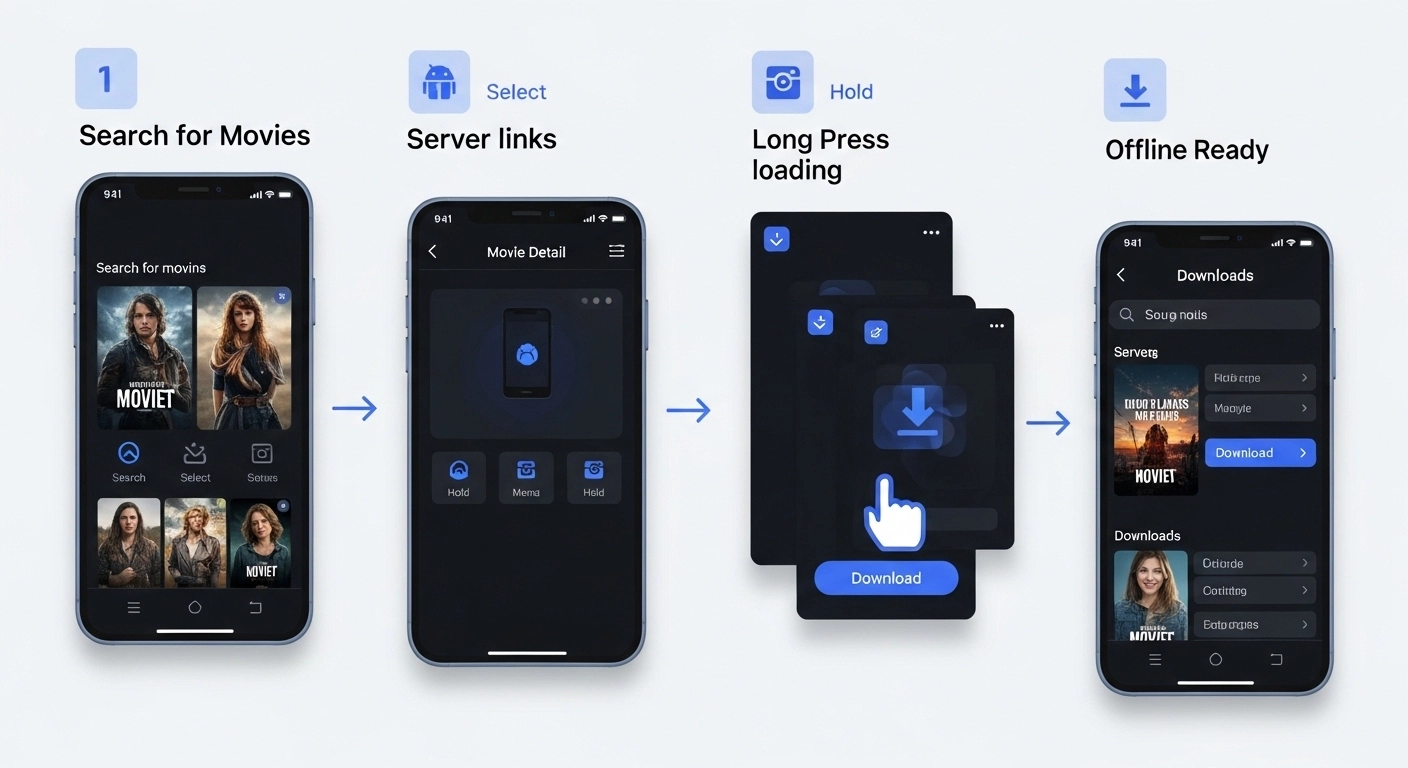
To download videos from the CloudStream app, you must first install a working extension repository. Search for your desired movie or anime, wait for the source links to scrape, long-press on your preferred server link, and tap ‘Download’. The MP4 file will save to your Android storage natively.
The CloudStream App is completely revolutionizing how we consume digital media on Android. Unlike traditional closed-source platforms, CloudStream does not host any pirated or copyrighted databases itself. Instead, it acts as a remarkably advanced media player and web-scraper that pulls high-definition links directly through authorized APIs.
Whether you are looking to save your favorite Hollywood blockbusters, trending series, or exclusive dual-audio Anime for offline viewing, this open-source application provides a seamless, ad-free ecosystem. Downloading content directly to your local storage is essential for traveling or facing network throttling. Here is the exact technical process to build your ultimate offline library safely.
Crucial Pre-Requisite Setup
Before you can download anything, you MUST have the correct repository extensions installed. CloudStream comes entirely blank upon first installation to remain strictly compliant with global copyright laws. Install a verified repository (like the community Mega Repo) to populate your app’s search engine.
Top Scraper Extensions for 2026
Sorastream
The fastest overall multi-host scraper, perfect for pulling 1080p movies with zero API buffering capacities.
SuperStream
Extremely reliable for TV series, offering complete season metadata scraping in one go with high server retention.
AnimeScrap
Dedicated strictly to high-quality anime, offering dual-audio selection and hard-coded subtitle files natively.
Step-by-Step Offline Preparation Protocol
Query Your Desired Title
Open the CloudStream app interface and utilize the universal search functionality. Type the exact name of the film. Tap on the correct poster to enter the details page containing cast data and HD trailers.
Run the Server Scraper
Scroll down to the ‘Episodes’ or ‘Links’ section. Give the API 5 to 10 seconds to scrape the internet for safe domains. Once populated, long-press (hold down) on the specific server link you wish to download.
Initiate the Fetch Command
A popup context menu will appear overlaying the screen. Tap on Download. The file will seamlessly begin fetching in the background without launching external browsers.
Access Your Offline Library
Monitor your live progress natively by navigating to the dedicated 'Downloads' tab on the bottom bar of the app. Once completed, watch it via the internal player with zero Wi-Fi connection needed.
Pro Optimization Configs
Quality Automation
Navigate to Settings > Player > Auto Quality. Fix it to 1080p so the system automatically grabs your preferred resolution without asking repeatedly.
Boost Network Limits
Unlock massive download speeds by going to Settings > Network > Parallel Downloads. Increase the thread limit to 4 to maximize bandwidth efficiency.
Custom Save Path
If your Android storage is constantly full, route all MP4 downloads directly to your internal SD Card via Settings > Downloads > Path.
Deep-Dive Setup FAQs
Why is my CloudStream download speed incredibly slow?
Speeds depend entirely on the third-party server hosting the file, not the application itself. If a server is overloaded, cancel the download and select an alternative server cluster from the links menu.
Are subtitles downloaded alongside the video?
Yes. If you select a streaming source with embedded soft-subs, CloudStream will automatically fetch the correct .srt file and bundle it directly with your video download.
Why does my download stay frozen at 0%?
A persistent 0% freeze means the scrapable source link is dead or IP-blocked in your region. Rather than waiting, immediately abandon that link and scrape another server host.
Can I play these files using external players like VLC?
Absolutely. CloudStream saves unencrypted, standard .mp4 or .mkv files directly into your Android file manager. You can play them flawlessly with VLC, MX Player, or cast them.